
To provide a more flexible and convenient payment experience, the YoloLiv Dashboard now supports Credit Card payments, in addition to the existing PayPal option.
You can now use Credit Card payments in the Dashboard for:
- Monthly or annual plan subscriptions
- Purchasing additional Bandwidth
- Purchasing additional Bonding Bandwidth
This guide will walk you through how to use credit card payments step by step.
How to Subscribe to a Plan Using a Credit Card (Monthly / Annual)
Step 1: Register a Dashboard Account (New Users)
If you are a new user, please register for a Dashboard account first:
👉 Registration link: https://dashboard.yololiv.com/user/login
Once registration is complete, log in to access the Dashboard.
Step 2: Go to the Plans Page
Both new and existing users can visit the Plans page directly:
👉 Plans page: https://dashboard.yololiv.com/settings/plans
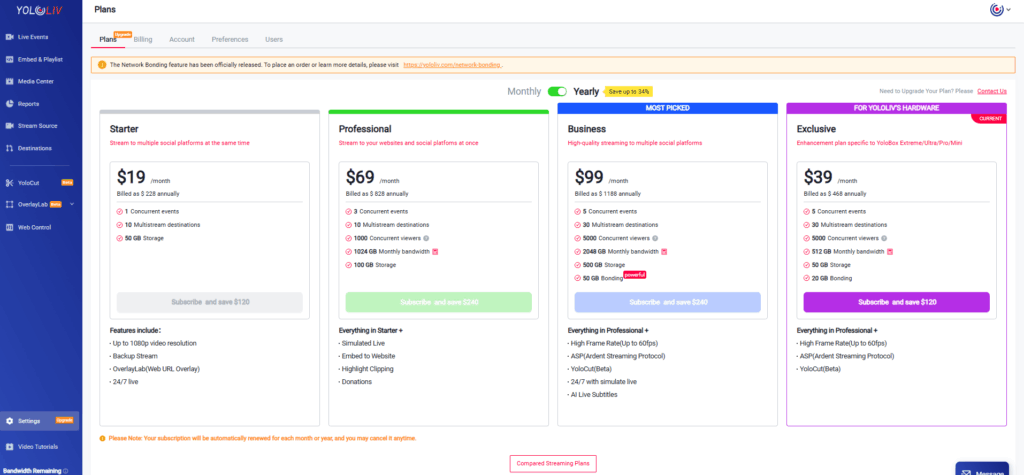
On this page:
- New users can select a plan to subscribe to
- Existing users can renew their current plan
📌 If you would like to upgrade, downgrade, or change your plan, please contact me directly: 📩 hazelhe@yololiv.com
Step 3: Choose Your Payment Method
After selecting a plan, you will be taken to the payment page. You will see two payment options:
- PayPal
- Credit Card
In this guide, we will use Credit Card as the example.
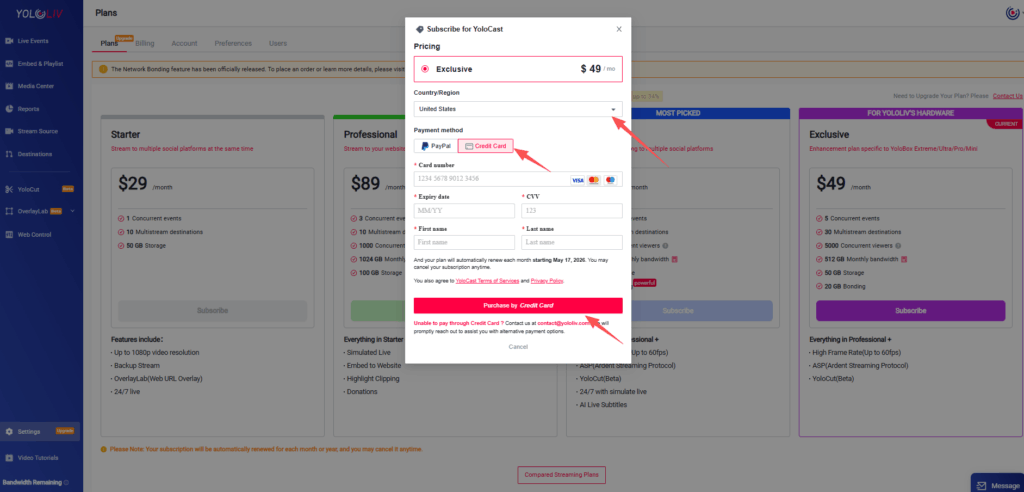
Select Credit Card, then fill in the required payment details as prompted.
Step 4: Complete Your Subscription
After confirming your information, submit the payment to complete your monthly or annual subscription.
The process is secure, simple, and does not require leaving the Dashboard.
How to Purchase Additional Bandwidth or Bonding Bandwidth
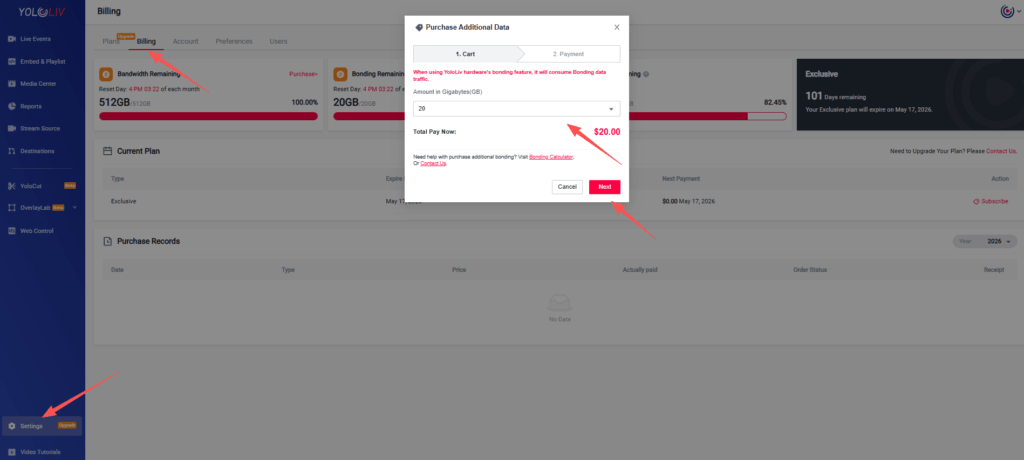
If you need more bandwidth for your live streams, you can also purchase it directly in the Dashboard using a credit card.
Step 1: Go to the Billing Page
👉 Billing page: https://dashboard.yololiv.com/settings/billing
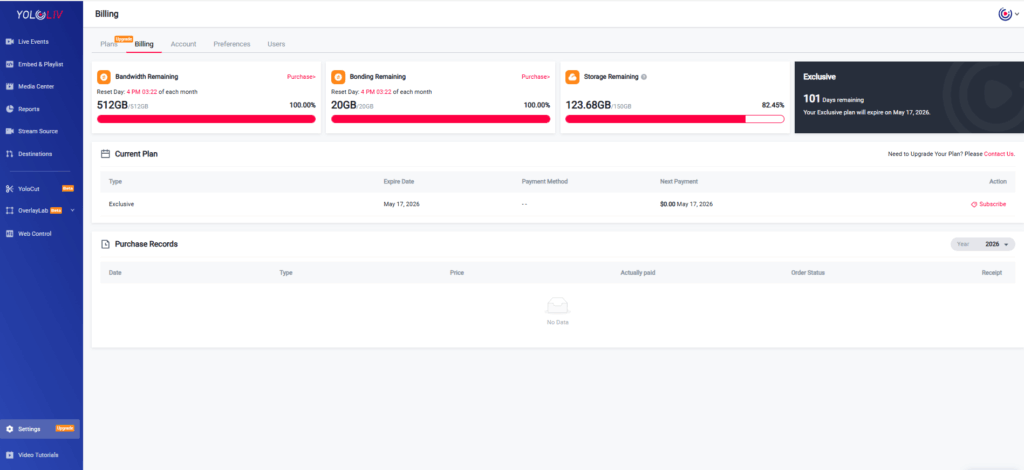
On this page, you will see two options:
- Bandwidth
- Bonding Bandwidth
Step 2: Choose the Bandwidth Type
🔹 Bandwidth
- Used for viewers watching your live streams or embedded playback
- Price: $75 / 512GB
- Minimum purchase: 512GB
🔹 Bonding Bandwidth
- Used only for Bonding functionality
- Price: $1 / GB
- Minimum purchase: $20
Please select the type and amount of bandwidth based on your actual needs.
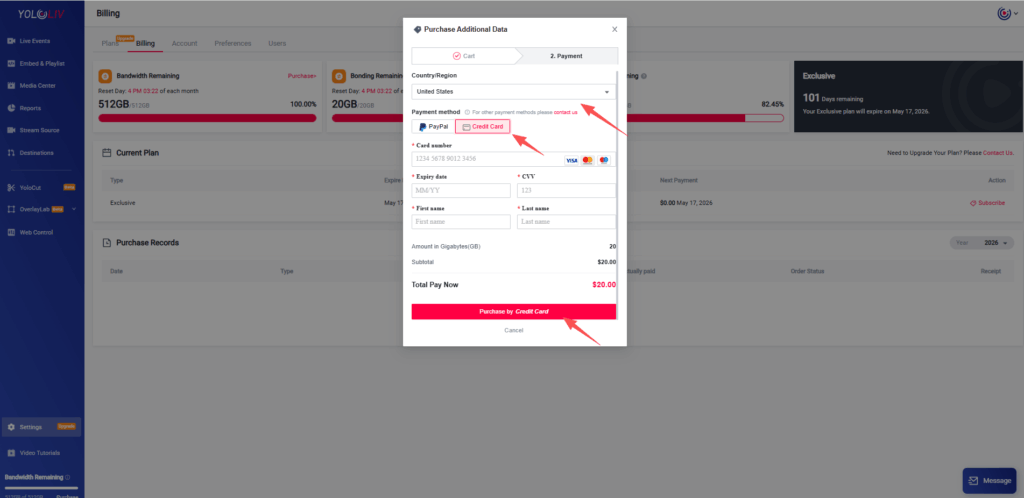
Step 3: Pay with a Credit Card
Once you have selected your bandwidth:
- Choose Credit Card as the payment method
- Enter the required credit card information
- Submit the payment to complete your purchase
The additional bandwidth will be available shortly after payment is successful.
Large or Custom Bandwidth Needs
If you have large-scale or customized Bandwidth or Bonding Bandwidth requirements, feel free to reach out directly. We’ll be happy to help you find the most suitable solution:
Payment Issues or Failed Transactions
If your subscription payment fails or you encounter any issues when paying with a credit card or PayPal, please contact us as soon as possible:
Our team will assist you promptly to ensure your subscription or purchase is completed successfully.
With the addition of credit card payments, managing your subscriptions and bandwidth in the YoloLiv Dashboard is now easier and more flexible than ever. We hope this guide helps you complete your payments smoothly and enjoy uninterrupted live streaming.
1,464 total views, 19 views today

Betty,As a Customer Success Specialist at YoloLiv, she is passionate about helping users understand YoloCast’s features and resolve day-to-day usage challenges. In addition to hands-on support, she creates practical articles that share tips, troubleshooting guidance, and best practices to help users get more value from YoloCast.
