
Streaming at a professional level may be more accessible than ever, but behind every smooth broadcast is the bandwidth that’s easy to overlook. As we move through 2026, live streaming has become more demanding—and more intelligent—than before.
Add to that the rise of AI-driven bandwidth monitoring, dynamic bitrate adaptation, and multi-CDN delivery, and it’s clear that a solid bandwidth strategy is no longer optional. It’s now a core part of successful, reliable streaming.
In this video bandwidth guide for professional streamers, we’ll break down everything you need to know about video bandwidth: what it is, how it works, how to calculate it, and how it impacts your streaming costs on YoloCast.
What Is Video Bandwidth?
Video bandwidth refers to the amount of data that can be transferred over a network within a given period of time, usually measured in megabits per second (Mbps).
In live streaming, bandwidth directly determines:
- How smooth your video playback is
- Whether viewers experience buffering or quality drops
- How much you ultimately spend on streaming services
In simple terms, bandwidth is the fuel that keeps your live stream running.
Upload Bandwidth vs Download Bandwidth
When planning a live stream, it’s important to understand that bandwidth has two sides:
Upload Bandwidth
Upload bandwidth is used by broadcasters to send video data from their encoder or device to the cloud or streaming server.
If upload bandwidth is too low, your stream may stutter, drop frames, or fail before it even reaches viewers.
👉 On YoloCast, upload bandwidth is fully covered by us.
You do not need to worry about upload costs or limits.
Download Bandwidth
Download bandwidth is what viewers use to receive and play your stream on their devices.
If viewers have limited internet speed, unstable connections, or ISP throttling, they may experience:
- Buffering
- Lower resolution
- Playback failure
👉 On YoloCast, all bandwidth usage in your plan refers to download bandwidth only.
This is the only bandwidth you need to plan and manage.
How Geographic Location Affects Bandwidth
Viewer location plays a significant role in bandwidth performance.
Audiences in rural or bandwidth-constrained regions may struggle to watch high-resolution streams.
This is where adaptive bitrate streaming, multi-CDN delivery, and edge servers become essential.
YoloCast automatically delivers streams from geographically closer nodes, helping maintain smooth playback even under challenging network conditions.
Key Streaming Metrics That Influence Bandwidth
Several technical factors directly affect how much bandwidth your stream consumes:
1. Bitrate
Bitrate defines how much data is sent per second.
Higher bitrate = better quality = higher bandwidth usage.
Example:
- 720p @ 2 Mbps → lower bandwidth
- 1080p @ 5 Mbps → significantly higher bandwidth
2. Frame Rate
A standard live stream runs at 30 fps.
High-motion content such as sports or live events often requires 60 fps for smooth playback—doubling frame data and increasing bandwidth demand.
3. Viewer Count (or Distribution Targets)
Each viewer—or distribution destination—adds to total bandwidth consumption.
This becomes especially important for multistreaming, which changed in 2026 (more on this below).
4. CDN & Delivery Architecture
Multi-CDN setups and edge delivery help reduce buffering and packet loss, especially for global audiences, by distributing streams from the closest available servers.
How to Calculate Bandwidth Usage for Video Streaming
The standard bandwidth calculation formula remains:
Bandwidth (GB) = Bitrate (Mbps) × Duration (Seconds) × Number of Viewers ÷ 8 ÷ 1024
Where:
- Bitrate = your streaming bitrate
- Duration = total stream time
- Viewers = total number of recipients (including platforms)
- ÷8 converts bits to bytes
- ÷1024 converts MB to GB
Example
A 45-minute stream (2,700 seconds) at 4 Mbps sent to one destination:
4 × 2,700 ÷ 8 ÷ 1024 ≈ 1.3 GB
This simplified model becomes very important in 2026.
Does Multistreaming Use My YoloCast Bandwidth in 2026?
Yes. Starting in 2026, multistreaming does consume YoloCast bandwidth.
To make this easy to understand, YoloCast now treats each streaming destination as one viewer for bandwidth calculation purposes.
How This Works in Practice
- Streaming to 1 platform (e.g. Facebook)
→ Equivalent to 1 viewer - Streaming to 3 platforms (Facebook + YouTube + Twitch)
→ Equivalent to 3 viewers
A Simple Example
If you:
- Stream once per month
- For 45 minutes
- To one platform
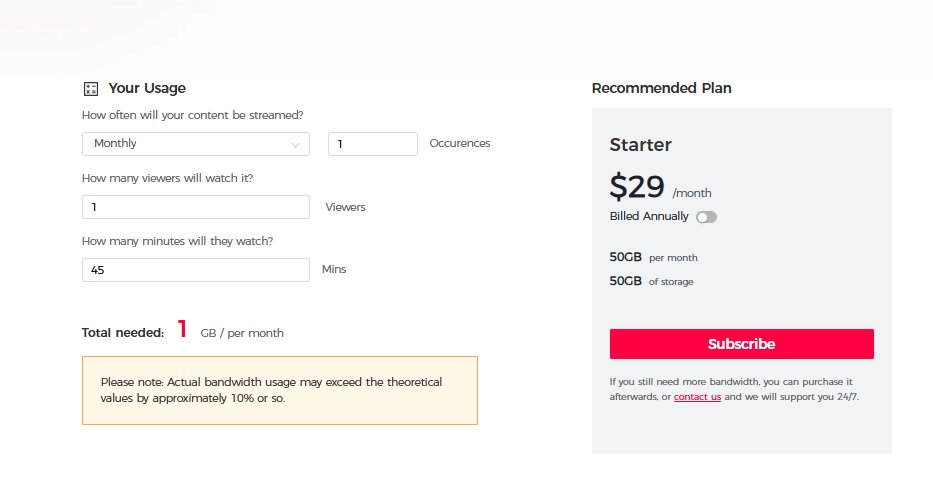
You will consume approximately 1 GB of bandwidth.
If you stream to three platforms, the bandwidth usage becomes roughly 3 GB for the same session.
👉 This approach makes bandwidth usage predictable, transparent, and easy to plan, especially for professional workflows.
To estimate your exact usage—including bitrate, duration, and number of platforms—use our official tool:
🔗 YoloCast Bandwidth Calculator
Trends in Bandwidth Management for Streaming in 2026
Live streaming technology continues to evolve rapidly. In 2026, several trends are shaping how professionals manage bandwidth:
- AI-powered bandwidth optimization to detect congestion in real time
- Dynamic bitrate adaptation to maintain quality without wasting data
- Multi-CDN redundancy for higher reliability during critical events
- Usage-based planning tools that simplify cost forecasting
These advancements help streamers deliver higher-quality content while keeping bandwidth usage under control.
YoloCast Bandwidth Plans (2026)
YoloCast offers flexible plans designed for different streaming needs:
| Plan | Price / Month | Included Bandwidth |
| Starter | $29 | No bandwidth included |
| Exclusive | $49 | 512 GB / month |
| Professional | $89 | 1 TB / month |
| Business | $119 | 2 TB / month |
Need more?
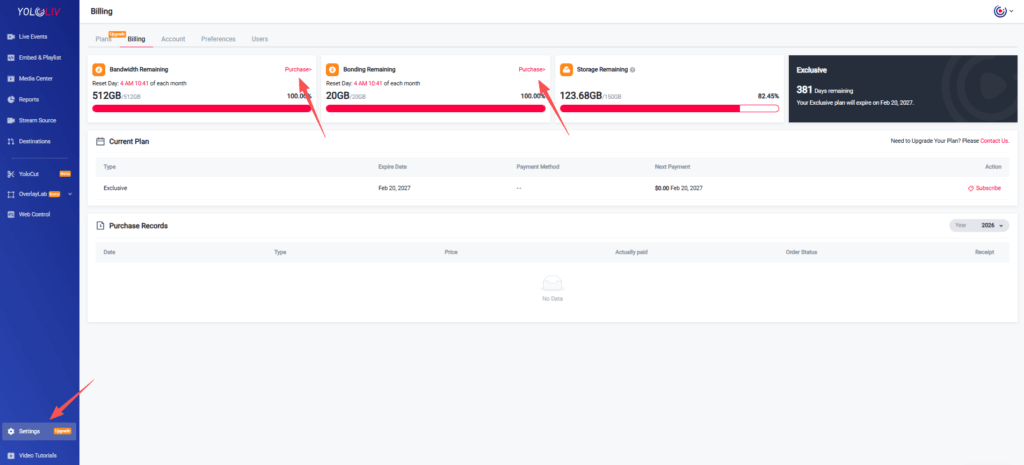
Additional bandwidth can be purchased at $75 for 512 GB, directly from your billing page.
If you have higher or more customized bandwidth needs, feel free to reach out to us directly:
📩 hazelhe@yololiv.com
We’ll be happy to help you find the most suitable solution for your streaming workflow.
Conclusion
Bandwidth is the foundation of every successful live stream. Without proper planning, even the best content can suffer from buffering, low quality, or failed playback.
For YoloCast users in 2026, remember:
- Bandwidth in your plan refers to download bandwidth only
- Upload bandwidth is fully covered by YoloCast
- Multistreaming does consume bandwidth, calculated per platform
- A single 45-minute stream to one platform uses about 1 GB
- Use the Bandwidth Calculator to plan accurately
With the right strategy, you can stream confidently—knowing your audience will enjoy smooth playback and your costs will stay predictable.
FAQ
1. What happens if I exceed my bandwidth limit?
You can purchase additional bandwidth anytime from the YoloCast billing page:
https://dashboard.yololiv.com/settings/billing
2. Does multistreaming always cost more bandwidth?
Yes. Each platform is treated as one viewer for calculation purposes. More platforms mean more bandwidth usage.
3. Which YoloCast plan should I choose?
It depends on your streaming frequency, duration, and number of platforms. Visit our Compare Plans page to find the best fit for your workflow.
2,045 total views, 39 views today

Betty,As a Customer Success Specialist at YoloLiv, she is passionate about helping users understand YoloCast’s features and resolve day-to-day usage challenges. In addition to hands-on support, she creates practical articles that share tips, troubleshooting guidance, and best practices to help users get more value from YoloCast.
