
Online fitness has grown into a full-time profession for thousands of instructors. Whether you run live Zoom classes, record YouTube workouts, or stream on Instagram Live, your camera is the connection between you and your clients. A blurry or dark video feed undermines your professionalism and makes it harder for participants to follow your movements.
The YoloCam S3 is built for exactly this type of demanding video work. Its wide field of view, fast autofocus, and large sensor handle the unique challenges of fitness streaming — movement, mixed lighting, full-body framing — better than any standard webcam.
The Unique Camera Needs of Fitness Instructors
Fitness instruction is one of the most demanding webcam use cases. Unlike a talking-head setup for video calls, fitness streaming requires:
Full or partial body framing. Your clients need to see your form, your footwork, and your body position. A tight facial crop is useless for demonstrating a squat or a push-up.
Fast, reliable autofocus. You move continuously during a session. You step forward to demonstrate, step back to give space, crouch down for floor exercises, and stand tall for overhead movements. Autofocus must keep up with all of it without hunting or blurring.
Strong low-light performance. Many instructors teach in home gyms, garages, or living rooms with limited lighting. The camera must produce a clean image without requiring professional lighting equipment.
Wide coverage. A narrow field of view misses movements that happen at the edges of the frame. A wider lens captures more of your space and gives participants a better view.
The YoloCam S3 addresses all four of these needs directly.
Why the YoloCam S3 Works for Fitness Streaming
90° Wide Field of View
The S3’s 90° field of view is significantly wider than the 65–78° typical of standard webcams. In a typical living room or garage gym setup, this wider angle captures more of your body and your surrounding space.
Moreover, you can position the camera further back to capture a full-body frame without losing image detail. At 4K resolution, even a full-body shot retains enough detail for clients to see your form clearly.
Phase-Detection Autofocus
The S3 uses phase-detection autofocus (PDAF). This is the same technology used in professional sports photography cameras. It detects movement and refocuses in milliseconds rather than the half-second or longer typical of contrast-detection systems.
In practice, this means the S3 stays focused when you step forward to demonstrate a movement, move laterally during a drill, or drop to the floor for a push-up. Your clients always see a sharp image. There are no blurry frames between movements. For a technical explanation of how PDAF works, see our autofocus deep dive.
1/1.3-Inch Sensor for Any Workout Environment
Most fitness instructors do not teach in professionally lit studios. Home gyms and living rooms have overhead lights, windows at various angles, and inconsistent illumination across the frame.
The S3’s large sensor handles these conditions far better than small-sensor webcams. It gathers more light, produces less digital noise in dim areas, and renders colors more accurately under mixed lighting. Consequently, you look sharp and professional regardless of whether you teach at noon with a bright window behind you or at 7pm under basic overhead lighting.
4K Resolution for Detail and Cropping Flexibility
The S3 captures at 4K 30fps. This high resolution gives you flexibility in post-production and live streaming. If you frame wide to capture full-body movement, you can still crop in during editing to create a tighter shot for close-up demonstration sequences.
Additionally, some streaming setups use digital pan-zoom to follow the instructor during a session. Starting from a 4K source means this zoom retains much more detail than zooming into a 1080p feed.
Recommended Setup for Fitness Instructors
Camera Placement
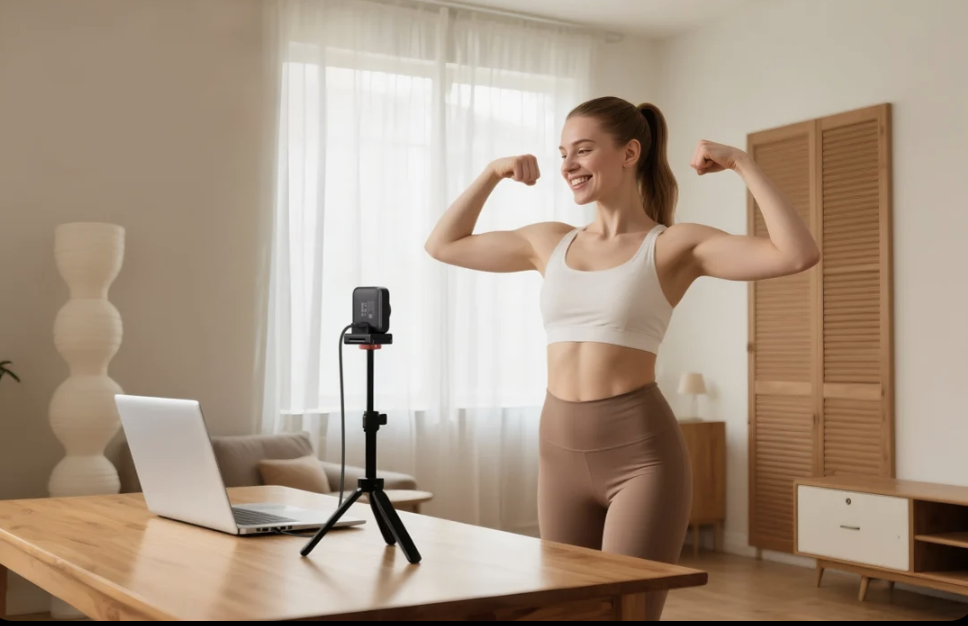
For full-body coverage, mount the S3 on a tripod at approximately chest to shoulder height, 6–10 feet away from your main teaching position. This distance, combined with the 90° field of view, captures most movements from head to foot.
For upper-body or seated workouts such as yoga, pilates, or stretching, you can position the camera closer and lower, angling slightly upward to capture the full range of movement.
Lighting for Fitness Spaces
Fitness spaces present lighting challenges. Many home gyms and garages use overhead fluorescent or incandescent lights. These cast downward shadows that can make your face appear dark.
Add a light source in front of you — even a basic LED ring light or a panel light — to balance the overhead illumination. This front-facing fill light makes your face clearly visible even during dynamic movement. For a complete lighting guide, see our webcam lighting guide.
Audio
The S3 does not include a built-in microphone. For fitness instruction, clear audio is essential — your cues, counts, and encouragement need to reach clients clearly over the sound of movement.
Use a wireless lavalier microphone clipped to your clothing. This keeps the mic close to your mouth regardless of your position in the room. Alternatively, a directional USB desk microphone works well for more stationary instruction styles. Avoid relying on laptop or webcam built-in audio — the distance and ambient noise make it inadequate for active fitness sessions.
Streaming Platform Settings
For live classes on Zoom or Google Meet, select YoloCam S3 as your video source and enable HD video in your platform settings. For pre-recorded YouTube content or Twitch streams, use OBS Studio to capture at 4K and encode at the appropriate bitrate for your platform. Our OBS setup guide covers the full configuration process.
Fitness Use Cases: Which Instructors Benefit Most
Yoga and pilates instructors benefit from the S3’s wide field of view and smooth autofocus during slow, deliberate movements. Clients need to see your full body position clearly. The 4K resolution captures the precise alignment details that make yoga instruction effective.
HIIT and cardio instructors rely on fast autofocus to stay sharp during rapid, explosive movements. The S3’s PDAF handles high-speed lateral movement, jumping, and sudden direction changes that defeat slower autofocus systems.
Personal trainers doing one-on-one sessions over Zoom benefit from the S3’s clean image in typical home environments. Your clients see a sharp, professional video feed that reinforces your credibility and expertise.
Dance and movement coaches teaching online need the widest possible field of view to capture full choreography sequences. The S3’s 90° lens and 4K resolution combine to show full-body movement with clarity.
Comparison: YoloCam S3 vs Standard Fitness Streaming Setups
Many fitness instructors start with a laptop webcam or a basic 1080p USB webcam. These work for simple upper-body video calls but fall short for active fitness instruction.
Standard 1080p webcams have narrow fields of view (typically 65–70°) that crop out lower-body movement. Their small sensors struggle in dim gyms. Their contrast-detection autofocus blurs during fast movement and takes time to refocus.
The S3 addresses all three limitations. The wider field of view captures more of your body. The larger sensor produces clean images in dim spaces. The PDAF stays locked through continuous movement.
Furthermore, the upgrade in image quality is immediately visible to your clients. Sharp, professional video builds trust and communicates that you take your online instruction seriously.
Technical Requirements
The S3 connects via USB-C and requires no drivers on Windows or macOS. It works immediately with Zoom, Google Meet, OBS Studio, Streamlabs, and any platform that supports standard USB cameras.
For 4K output, connect to a USB 3.0 port. Most current laptops support this natively. If you use a USB hub, ensure it is USB 3.0 rated to avoid bandwidth limitations.
Final Thoughts
The YoloCam S3 is the most capable webcam available for online fitness instruction in 2026. Its wide field of view, fast PDAF autofocus, large sensor, and 4K resolution handle every challenge that fitness streaming presents.
Consequently, more professional instructors are choosing the S3 as their primary teaching camera. It removes the technical barriers and lets you focus entirely on delivering great instruction to your clients. Add a wireless lavalier microphone, set up basic front lighting, and your online studio is ready.
75 total views, 75 views today

Meredith, the Marketing Manager at YoloLiv. After getting her bachelor’s degree, she explores her whole passion for YoloBox and Pro. Also, she contributed blog posts on how to enhance live streaming experiences, how to get started with live streaming, and many more.
